Burned-In Text Removal for Shorts with ProPainter
Per-shot video inpainting that removes captions, numbers and watermarks cleanly, with mask strategies matched to each text style.
OCR-derived extents, glyph templates lifted from interstitial frames, solid boxes for drop-shadowed words, hue-matched glow masks for glowing captions, shot-bounded inpainting and a Real-ESRGAN upscale, plus the pip trap that swaps CUDA torch for CPU.
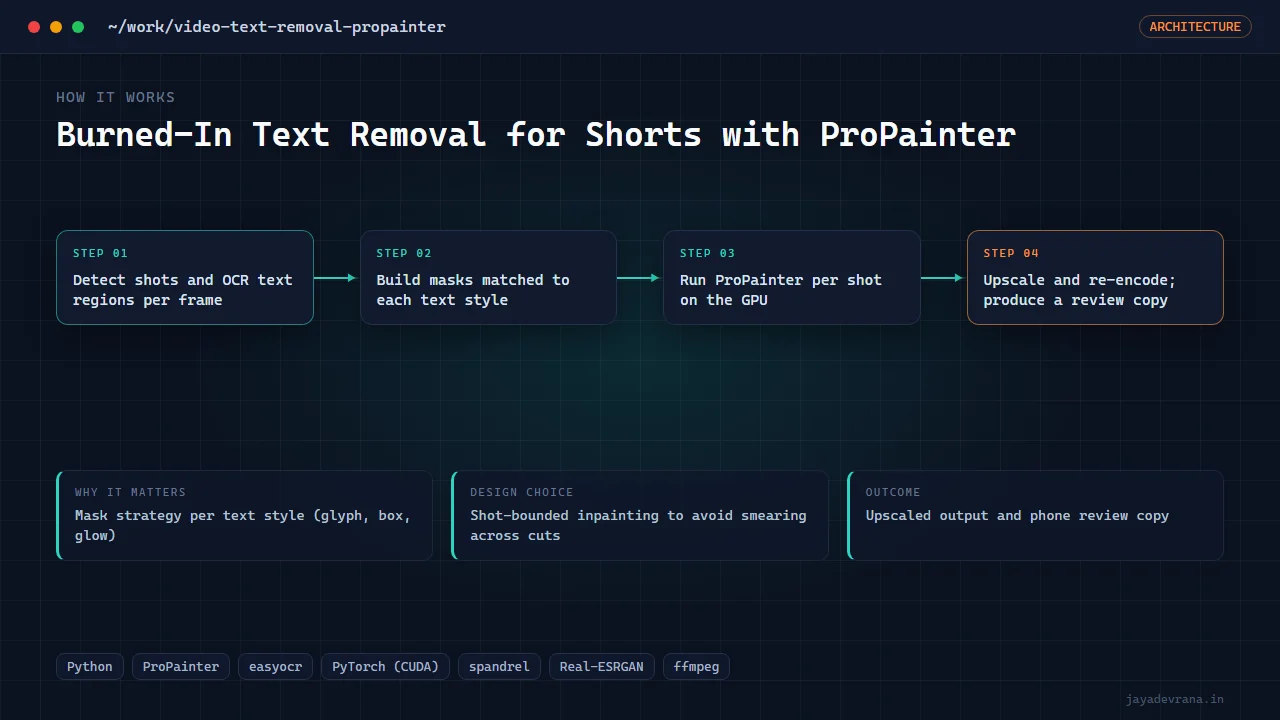
- Mask strategy per text style (glyph, box, glow)
- Shot-bounded inpainting to avoid smearing across cuts
- Upscaled output and phone review copy
- CUDA-vs-CPU torch trap documented
A client channel needed existing Shorts re-used without their burned-in captions, ranking numbers and watermark. Generic inpainting leaves ghosts, so the pipeline treats each text style differently. OCR gives the extents; number labels use glyph templates lifted from black interstitial frames; bold words with drop shadows need solid boxes because glyph-shaped masks leave grey shadow between letters; glowing captions need a hue-matched glow mask extending tens of pixels or a coloured haze remains.
ProPainter runs per shot, never across cuts, with half precision, minimal mask dilation and a sub-video length that fits the GPU. The result is upscaled with a Real-ESRGAN general model and a phone-sized copy is produced for review under messaging size limits.
One environment trap is worth the note alone: installing a vision utility library pulled a CPU-only PyTorch over the CUDA build and silently slowed everything; new libraries are now installed without dependencies and the CUDA wheel pinned.
How it works
- Detect shots and OCR text regions per frame
- Build masks matched to each text style
- Run ProPainter per shot on the GPU
- Upscale and re-encode; produce a review copy