Skynet: Multi-Tenant TradingView Alert Execution Service
A hosted service that turns a client's TradingView alert into a real order on their own broker account.
Live at skynet.sbs: per-client webhook URLs, a Binance connector, an India module with Zerodha futures FLIP mode, and a dial-out agent design so no client PC ever opens a port.
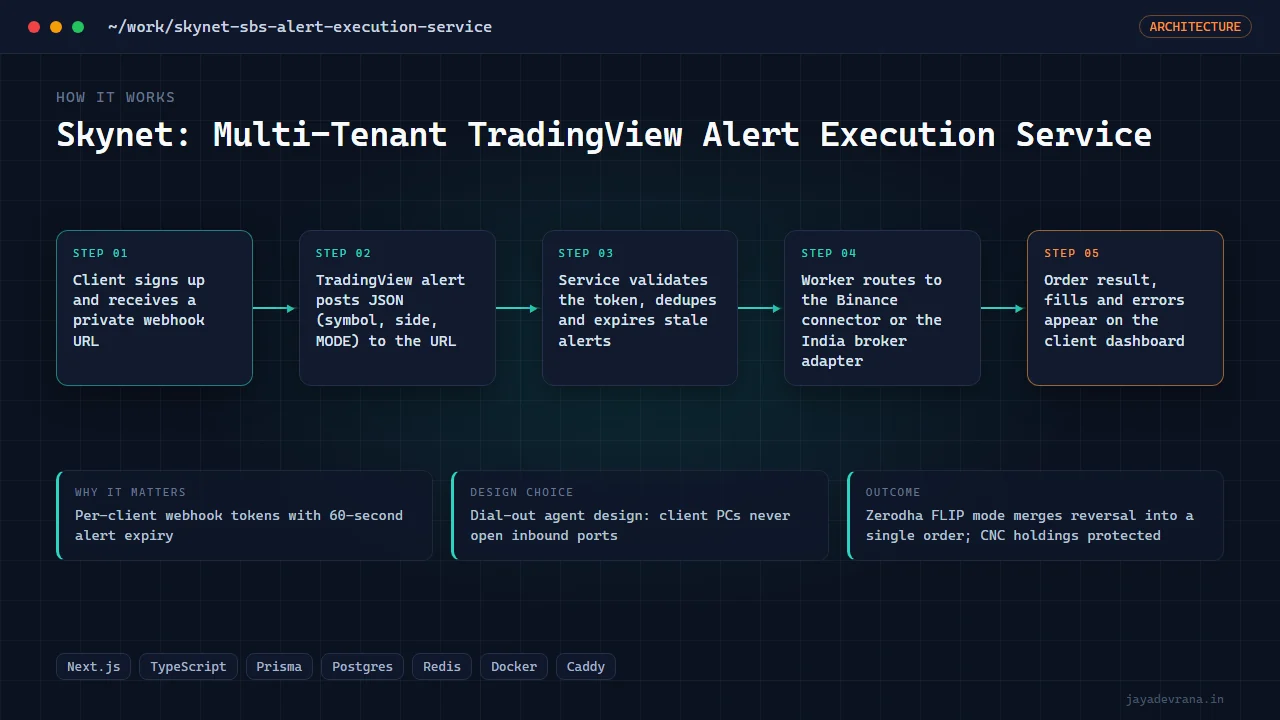
- Per-client webhook tokens with 60-second alert expiry
- Dial-out agent design: client PCs never open inbound ports
- Zerodha FLIP mode merges reversal into a single order; CNC holdings protected
- 560 automated tests pass, deployed with Let's Encrypt behind Caddy
Most alert-to-broker setups ask a trader to run a server, open ports, and trust a stranger with API keys. Skynet was designed to remove all three. A client gets a random webhook URL from the site, pastes it into TradingView, and either connects an exchange account (Binance Spot today) or pairs a small agent that dials out from their own machine. Broker credentials never touch the server; a stolen webhook URL can only enqueue, never reach a machine.
The service is a Next.js application with a worker, Postgres and Redis behind Caddy, deployed on a cloud VM with automated certificates. It was assembled from two earlier systems: the single-tenant TradingView-to-MT5 bridge (its webhook grammar, EA and simulator) and the multi-account remote-ops relay (its dial-out and per-account isolation). An India module adds Zerodha futures automation with a FLIP entry mode that merges an opposite position into one order, CNC-safe exits that never touch holdings, a static egress IP for broker whitelisting, Pine alert templates, and a 560-test suite.
Alerts expire after about 60 seconds by design, so a laptop that wakes from sleep cannot fire a six-hour-old signal. The product also hosts the Skynet Terminal marketing site and download.
Executes live broker orders; shared as engineering work, not financial advice.
How it works
- Client signs up and receives a private webhook URL
- TradingView alert posts JSON (symbol, side, MODE) to the URL
- Service validates the token, dedupes and expires stale alerts
- Worker routes to the Binance connector or the India broker adapter
- Order result, fills and errors appear on the client dashboard
Software and automation are infrastructure, not financial advice. No performance guarantees. Every live system needs staged testing, risk limits, and owner approval.