Is There a SuperTrend EA for MT5 That Trades Automatically? Yes
A SuperTrend EA for MT5 that trades automatically: TradingView-matching ATR, stop-and-reverse on each flip, risk sizing, hours and spread filters, verified.
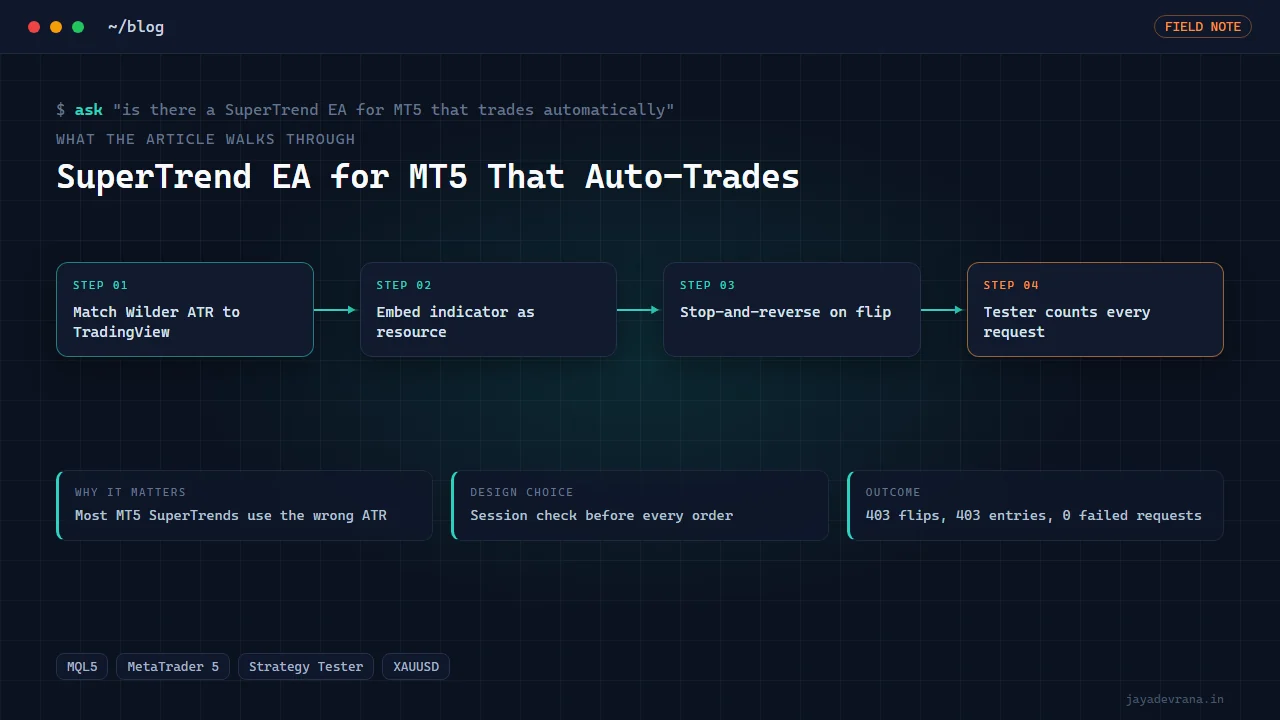
Yes, a SuperTrend EA for MT5 that trades automatically exists, and I built one: a self-contained Expert Advisor that computes the SuperTrend line with Wilder's ATR so its values match TradingView, enters on every flip as a stop-and-reverse, places the stop on the SuperTrend line with optional trailing, and gates entries with a direction filter, trading hours and a maximum spread. The indicator is compiled into the EA as a resource, so a user installs one file and nothing else.
What most people searching this phrase actually want to know is whether such an EA can be trusted to behave the same as the SuperTrend they see on their chart, and what happens when the broker says no to an order. Both questions have concrete answers below, including the one bug that produced market-closed errors on every Monday bar until a session check was added. Trading tool, shared as engineering; whatever it does on a live account is the account owner's decision and risk.
Why does the MT5 SuperTrend not match TradingView by default?
Because SuperTrend is just ATR bands around a midpoint with a flip rule, and the ATR is where implementations diverge. TradingView's built-in uses Wilder's smoothing (a recursive moving average that weights the previous ATR heavily). Many MT5 SuperTrend indicators found online use a simple or exponential average of true range instead, which gives a different ATR, different bands and flips on different bars. Add in a different handling of the first bars and a different band-tightening rule and the two indicators can disagree for days.
Matching TradingView means:
- Compute true range exactly (the largest of high minus low, absolute high minus previous close, absolute low minus previous close).
- Smooth it with Wilder's method: previous ATR times period minus one, plus current true range, divided by the period.
- Upper band is the bar midpoint plus multiplier times ATR; lower band is midpoint minus.
- Tighten bands only in the trend direction: the lower band in an uptrend may rise but never fall unless the trend flips, and mirror for the upper band.
- Flip the direction when the close crosses the active band.
Once the indicator values match, every decision the EA makes is auditable against a TradingView chart of the same symbol, which is the only sane way to debug an EA that trades a visual indicator.
How does a stop-and-reverse EA handle a flip?
A flip means the SuperTrend direction changed on the last completed bar. The EA, evaluating once per new bar, does the following in order:
- Read the indicator's direction and line value for the previous completed bar.
- If the direction differs from the position currently held, close the open position with a market order.
- If the direction filter allows the new side and the hours and spread filters pass, open the opposite position with the configured lot size.
- Attach a stop loss at the SuperTrend line value, optionally with a buffer.
- On each subsequent bar, if trailing is enabled, move the stop to follow the line as it ratchets.
Because the EA acts on the completed bar, it never flips on an intrabar wiggle that reverses before the close, which is also how the TradingView indicator paints historically. The cost of that discipline is entering one bar after the flip; the benefit is that the backtest and the live behaviour agree.
What inputs should a SuperTrend EA expose?
Enough to adapt to different symbols, not so many that the user cannot reason about them. Mine has:
- Signal timeframe, so the EA can run on an M1 chart and still trade H1 SuperTrend flips.
- ATR period and multiplier, the two SuperTrend parameters.
- Sizing: fixed lots or risk-based sizing from the stop distance and a percentage of equity.
- Stop on the line with optional trailing and buffer.
- Direction filter: long only, short only or both.
- Trading hours window in server time.
- Maximum spread in points, above which no new entry is placed.
- Magic number and comment so positions are identifiable among other EAs.
Each filter is a gate on entries, not on exits. A flip against an open position always closes it, even outside hours, because leaving a position open against the trend because the clock says so is not what a stop-and-reverse system means.
Why did the EA fail on every Monday bar?
This is the finding worth the whole post. In the Strategy Tester on eight months of gold, the first version produced the right number of flips but a batch of failed order requests, all on Monday's first bar. The broker's gold session reopens one minute after the bar opens, so an order sent at the exact bar open was rejected with a market-closed error. The EA counted a flip, attempted an entry, failed, and did not retry.
The fix was a session-trade check before any order: query the symbol's trading sessions for the current day and verify the current server time is inside one before sending. With that check, the EA defers the Monday entry by a minute and the tester result became exactly 403 flips and 403 entries with zero failed requests. If you run any EA on metals or indices with session gaps, this check belongs in your order path. It is also the kind of problem that only appears when you count requests rather than just look at the equity curve.
Can you backtest an MT5 EA without the terminal UI?
Yes. The Strategy Tester accepts a configuration file that specifies the EA, symbol, period, dates, model and inputs, and the terminal can be started with that configuration so the test runs and writes its report without anyone clicking. I built a small headless harness around this for the SuperTrend project, including a workaround for a port conflict when a second terminal instance is launched for testing, and documented it for reuse.
One rule I keep: the main terminal on my machine is a real-money account, so automation is never allowed to attach an EA there. The EA was deployed to that terminal's folder, but attaching it to a live chart is a human click. For a broader view of how I treat EA lineage, parity and deployment for clients, see the custom TradingView-to-MT5 bridge post, which shares the same order-path discipline.
How I built this: SuperTrend Indicator and Stop-and-Reverse EA for MT5
The SuperTrend indicator and EA package is compact and complete, and it came together in this sequence:
- Indicator first. A SuperTrend indicator computed with Wilder's ATR, verified against TradingView's values on the same symbol and timeframe before any EA code was written.
- Embed as a resource. The indicator is compiled into the EA with a resource directive, so the distributed product is a single compiled file and there is no "indicator not found" support ticket.
- EA logic on new bars. Read the embedded indicator's direction and line, close on flip, open opposite side if filters allow, stop on the line, optional trail.
- Inputs. Signal timeframe, ATR period and multiplier, fixed or risk-based lots, line stop with trailing, direction filter, trading hours, maximum spread.
- Tester harness. A headless Strategy Tester run on eight months of gold, counting flips, entries and failed requests, not just profit.
- Session check. Added after the Monday market-closed errors, bringing the count to 403 flips, 403 entries and zero failed requests.
- Deploy, do not attach. Compiled file placed in the live terminal's folder; attaching to a live chart remains the owner's click.
The decisions I would repeat: match the indicator before trusting the EA, embed the indicator so installation is one file, count order requests in the tester, and keep automation away from live attachment. The outcome is an auto-trading SuperTrend EA whose behaviour can be checked against a TradingView chart bar by bar and whose order path has been proven clean across a full session calendar.
FAQ
Does the SuperTrend EA repaint or trade intrabar?
Neither. It evaluates on completed bars, so a flip is only acted on once the bar that produced it has closed. That matches the historical painting of the indicator and makes the tester result a fair representation.
Can it run on multiple symbols at once?
Attach one instance per symbol chart, each with its own magic number. The embedded indicator is computed per instance, so there is no shared state between symbols.
Is SuperTrend a profitable strategy?
That is a different question from "does the EA work". SuperTrend is a trend follower: it does well in sustained trends and gives back in chop, and the right period and multiplier depend on the symbol. In a separate crypto study I found the default setting as good as any after a two-million-run sweep, which says more about over-tuning than about the indicator. Test on your own symbol and costs.
Can I get the indicator alone, without the EA?
The indicator exists as its own file and can be used on any chart. The EA embeds a copy so that users of the EA do not need to install it separately.
If you want a SuperTrend EA or any indicator-driven EA built and tester-verified for your broker, tell me about it on the contact page.
Building something in this space? I ship trading automation, Pine Script, MQL5 EAs, and full-stack tools with source and docs.
Start a project →