How to Record TradingView Tutorial Videos Automatically (Typed Live)
How to record TradingView tutorial videos automatically: beat scripts, synthesised narration, code typed live over DevTools Protocol, 4K60 render and upload.
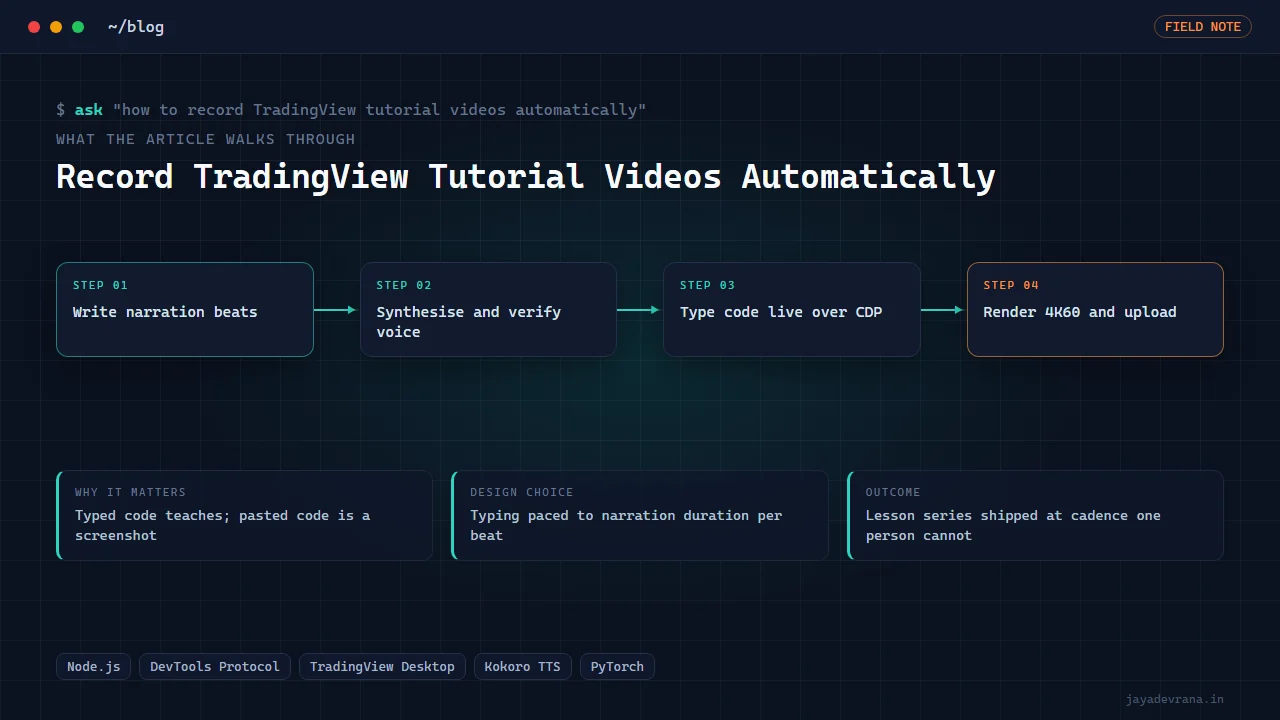
The way to record TradingView tutorial videos automatically is to stop thinking of a video as a screen capture and start thinking of it as a script that gets executed. Each lesson becomes a list of beats: a sentence of narration plus an action, such as type these lines into the Pine Editor, add the script to the chart, or change an input. A driver plays those beats against TradingView Desktop, a recorder captures the screen on cue, and a renderer turns the raw take into a 4K60 video with captions and chapters. No human touches the mouse during the take.
I built this because a course that teaches Pine Script by showing code pasted in is not teaching anything. Viewers need to see each line typed, compiled, and used on a real chart. Doing that by hand for forty lessons, twice over for two language tracks, was not an option. Here is how the automated version works, and the four ways a take can fail silently if you are not watching for them.
Why type the code live instead of pasting it?
Two reasons, one pedagogical and one practical. Pedagogically, watching code appear line by line while the narration explains it is how people actually learn syntax; a wall of pasted code is a screenshot with a voice. Practically, typed code gives the editor time to show its live error markers, and the narration can point at them when they appear. A lesson on a compile error only works if the viewer sees the red underline arrive.
Typing live also produces a typing log with timestamps, which later drives the key-click sound layer and tells the renderer exactly where the cursor was at every moment, so camera moves can follow the code.
How do you drive TradingView Desktop from a script?
TradingView Desktop is an Electron application, and it can expose a remote debugging port. Over the DevTools Protocol you can locate the Pine Editor's text surface, send key events, read the editor contents back, and click interface elements by their rendered position. My driver is a small Node process that:
- Opens a dedicated recording layout so my working chart is never touched.
- Creates a fresh script rather than editing whatever draft is open.
- Types each beat's text at a pace matched to the narration length for that beat, so the voice and the cursor arrive together.
- Issues the real keyboard chord for add-to-chart and waits for the compile result.
- Reads the editor back after each beat to verify the text landed exactly, character by character.
The pacing rule is the heart of it. Narration for a beat is already rendered, so its duration is known; the typing speed for that beat is set so the last character lands as the sentence ends. Long beats type slower, short beats faster, and the result feels like a presenter who knows what they are about to say.
How do you synthesise narration that survives technical vocabulary?
Pine Script lessons are full of words that text-to-speech mangles: function names, abbreviations, ticker symbols. The pipeline renders each sentence separately with a local voice model, caches it by text hash, and then transcribes every rendered clip back with a speech recogniser. If the transcription does not match the script within a tolerance, the beat is flagged and I fix it with a phonetic spelling or a rewrite before any recording happens. This transcription QA catches misreads that sound fine to a tired ear at midnight.
Rendering per sentence also means that editing one sentence in lesson twelve re-renders one clip, not the whole lesson.
How does the recorder know when to start and stop?
The screen recorder I use can itself be controlled over a debug port, so the same driver starts the recording, runs the beats, and stops it. That removes the classic mistake of a take that starts three seconds late or runs into the next window. Before the real take, the driver rehearses the whole lesson at high speed without recording, which catches a beat whose action fails (a dialog that did not open, an input that did not exist) before an eleven-minute take is wasted.
What can go wrong in an automated take?
Plenty, and most of it is silent. The four I now check for on every lesson:
- Anchor collisions: two interface elements with the same label, so a click lands on the wrong one. The rehearsal pass catches most of these.
- Chained setup: a beat that depends on state from a previous beat (an indicator already on the chart) which fails if the previous beat partially failed. Each lesson now starts from a known clean layout.
- Visually broken success: the driver reports success because the text landed, but the chart panel collapsed or a dialog covered the editor. The renderer now samples frames near the end of each segment and compares them against expectations.
- Notification toasts: a messaging app popped a notification with a contact's name over the chart during a take and it reached the published video. Every take is now scanned for toast-shaped regions before it leaves the machine, and notifications are silenced before recording.
How do you turn a raw take into a finished 4K60 lesson?
The renderer is a GPU process that reads the raw capture, the narration timings and the typing log, and composes the final video. It applies measured camera moves: a gentle push-in on the editor while code is being typed, a cut to the chart when the script is added, a hold on a table when the narration discusses values. The audio layer mixes the narration over a quiet synthesised bed with key clicks placed from the typing log. The packager then writes captions from the sentence timings, chapters from the lesson structure, a thumbnail, and a text file of the finished code for the description.
Because this TradingView build does not paint drawing objects in the recorded window, lessons that need visual callouts use an indicator table instead, which renders reliably. Know your platform's rendering quirks before planning a lesson around a feature.
How I built this: Pine Script Video Course, the typed-live lesson pipeline
The Pine Script Video Course pipeline is the full system described above, running for my channel's lesson series. The workflow per lesson is:
- A lesson file defines narration beats and editor actions (type, append, add to chart, set input).
- Local text-to-speech renders each sentence; transcription QA flags any misread for a rewrite.
- The Node driver rehearses the lesson, then records the typed take in a dedicated TradingView layout, with the recorder driven over its own debug port.
- A torch-based renderer applies camera moves and composes 4K60 with the narration, bed and key clicks.
- The packager writes captions, chapters, thumbnails and the Pine code as a text file.
- The uploader publishes with channel assertion and resumable uploads, builds the code page on my site, places the video in its playlist and schedules the daily cross-post.
Design decisions: record in an isolated layout, verify every beat by transcription and readback, sample frames instead of trusting status codes, and keep every stage re-runnable in isolation. The outcome is a lesson series produced at a cadence one person could not sustain manually, with lessons 22 to 24 covering repainting, object references and strategy fill models. A growth tracker reading channel data later showed that titles phrased as viewer problems earned roughly ten times the views of titles numbered "Lesson N", which changed how I name them. The lessons themselves build on material from my v5 to v6 migration guide and the non-repainting workflow post.
FAQ
Does this need TradingView's permission or a special API?
No special API. TradingView Desktop is a standard Electron app and the DevTools Protocol is a standard debugging interface. The driver only automates what a person would do with a keyboard and mouse in their own account, inside a layout created for recording.
Can the same pipeline record other software?
Any Electron or browser-based tool exposes the same protocol, so the driver generalises. Native applications need a different automation layer, but the beat script, narration, renderer and packager stages are unchanged.
How long does one lesson take end to end?
Narration rendering and QA take minutes. A rehearsal plus a real take is roughly the lesson's runtime twice over. The 4K60 render is GPU-bound and comparable to the runtime. Most of the human time goes into writing the beat script well.
Why 4K60 for a code tutorial?
Code is small text, and YouTube's compression at 1080p blurs it. Rendering at 4K gives the platform a higher bitrate ladder, and 60 frames per second keeps typed text and cursor motion readable when viewers scrub.
If you want an automated lesson or demo pipeline like this for your own product or course, tell me about it on the contact page.
Building something in this space? I ship trading automation, Pine Script, MQL5 EAs, and full-stack tools with source and docs.
Start a project →