How to Connect TradingView Alerts to MT5 Automatically (2026 Guide)
How to connect TradingView alerts to MT5 automatically: a webhook alert, a bridge that queues and dedupes events, and an adapter that opens, closes, reverses.
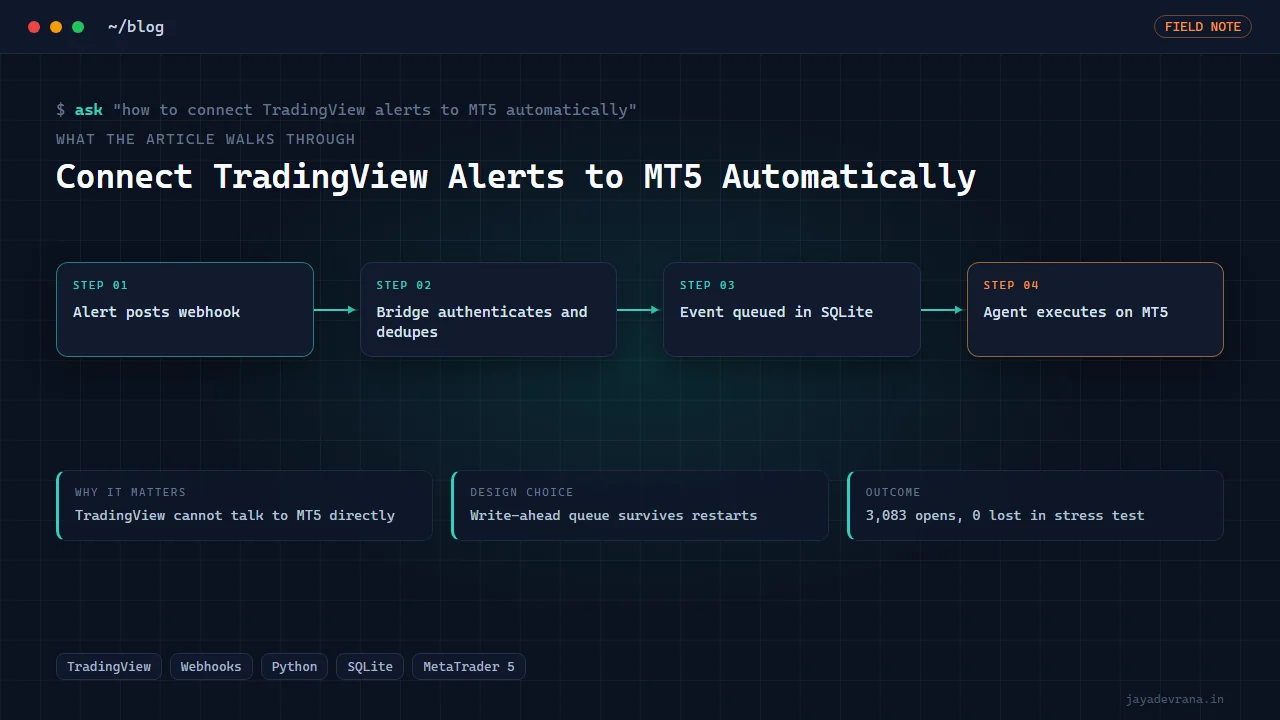
To connect TradingView alerts to MT5 automatically you need three parts: a TradingView alert with a webhook URL and a structured message, a bridge service that receives that webhook and turns it into a trade instruction, and an adapter that talks to a running MetaTrader 5 terminal (or an Expert Advisor inside it) to place, close or reverse the order. TradingView itself never speaks to MT5; the bridge in the middle is the whole job.
The simplest working chain looks like this: your Pine strategy fires an alert, TradingView POSTs the alert message to your bridge, the bridge validates it, writes it to a durable queue, and a worker picks it up and calls MT5. If you get those four steps right, you have a system you can leave running overnight. Get any of them wrong and you have duplicate orders, missed exits, or a bridge that forgets everything when Windows reboots. The rest of this post explains each step and then walks through how I built my own TradingView to MetaTrader 5 webhook bridge.
What does TradingView actually send when an alert fires?
When an alert fires on a paid TradingView plan with the webhook option enabled, TradingView sends an HTTP POST to the URL you set in the alert dialog. The body is whatever you typed into the alert message box, so you decide the format. Most people use a small JSON object with the symbol, the action (buy, sell, close, reverse), the quantity, and an identifier for the strategy or event.
Three details matter here. First, TradingView only POSTs to ports 80 and 443, so the bridge must sit behind a proper HTTPS endpoint or a tunnel. Second, TradingView retries nothing: if your bridge is down, the alert is gone. Third, the request arrives with no useful authentication header, so any secret has to live inside the message body or the URL path. The official alert documentation is at https://www.tradingview.com/support/solutions/43000529348-about-webhooks/ and is worth reading once because it lists the placeholders you can embed in the message, such as the ticker, close price and strategy order fields.
Why can't TradingView talk to MT5 directly?
MetaTrader 5 has no public inbound API for orders. The terminal exposes a Python integration package that works only on the same Windows machine, and Expert Advisors can poll files or sockets, but nothing on the MT5 side listens for a webhook from the internet. That is the gap every PineConnector-style product fills, and it is the gap a self-hosted bridge fills too. MetaQuotes documents the terminal-side Python integration at https://www.mql5.com/en/docs/python_metatrader5 if you want to see exactly what calls are available.
So "automatically" always means: something you control receives the alert and relays it. The decision is whether you rent that relay from a connector service or run your own. I wrote about that trade-off in my PineConnector alternative post, so here I will stay on the mechanics.
How should the bridge handle an alert so nothing is lost or doubled?
This is where most home-made bridges fail. The failure modes are predictable and the fixes are well known from message-queue engineering:
- Duplicate alerts. TradingView can fire the same alert twice (two charts, a re-armed alert, a copy-paste mistake), and your own retries can double it. Put a unique event ID in every message and have the bridge refuse any ID it has already seen.
- Lost alerts on restart. If the bridge holds the alert only in memory while it calls MT5 and the process dies, the alert vanishes. Write the event to disk before you acknowledge the POST, then process it from disk.
- Unauthenticated POSTs. Anyone who guesses your URL can send orders. Require a shared secret, and ideally a second factor such as an allow-list or a signature.
- Slow MT5 calls blocking intake. MT5 order placement can take hundreds of milliseconds. If intake and execution share one thread, a slow fill delays the next alert. Separate them with a queue.
Each of those maps to one component in a well-designed bridge: idempotency keys, a write-ahead log, dual authentication, and an agent/worker split. None of it is exotic, but you have to build all four or the system is not trustworthy with real money.
Can one alert open, close and reverse positions?
Yes, if the bridge understands those as distinct commands rather than just "buy" and "sell". Reverse is the one people get wrong. A naive bridge receives "sell" while long and simply sells the same quantity, which flattens the position rather than flipping it. A proper reverse command closes the existing position and opens the opposite side in one logical operation, and it must cope with the case where the first leg succeeds and the second fails.
I recommend making the alert message carry intent, not mechanics. Say "reverse to short" rather than "sell 0.2 lots", and let the bridge compute the correct volume from the live position it reads from the terminal. That way a missed fill or a manual intervention on the terminal does not leave the bridge and the account disagreeing about what is open.
How fast is TradingView alert to MT5 execution?
On a bridge I run locally against a demo account, a full round trip from alert firing to a confirmed ticket on the broker measured roughly 400 milliseconds for a BTCUSD market order. Most of that is TradingView's own alert delivery plus the broker's execution; the bridge itself adds a few milliseconds for validation and queue persistence. For strategies on 5-minute bars and above, that latency is irrelevant. For scalping on the 1-minute chart it matters, but there the bigger issue is that alerts fire on bar close or on tick depending on your settings, and that choice dwarfs any bridge overhead.
Alert-to-broker automation is engineering, not financial advice; whatever bridge you use, you are trading your own account at your own risk, and a faster pipe does not change the quality of the strategy on either end.
How I built this: TradingView to MetaTrader 5 Webhook Bridge
My TradingView to MetaTrader 5 webhook bridge is a Windows desktop application a single trader runs on the same machine as their MT5 terminal. It was designed around the four failure modes above, and the architecture reflects that:
- Dual-auth intake. A small HTTP server receives the TradingView POST. The request must carry the correct secret and pass a second check before it is even parsed. Anything that fails is logged and dropped with no side effect.
- Event-ID deduplication. Every accepted message has an event identifier. The intake compares it against a store of seen IDs and discards repeats. In a later stress test, a deliberate storm of forty duplicate alerts produced exactly zero duplicate orders.
- SQLite write-ahead queue. The validated event is written to a SQLite database in write-ahead-log mode before the HTTP response goes back to TradingView. If the machine loses power a second later, the event is still there when the bridge restarts.
- Agent/UI split. A separate agent process polls the queue and executes. The user interface only displays state and lets the trader pause, resume or inspect events. Crashing the UI never stops execution, and a hung broker call never freezes the window.
- MT5 adapter with open, close and reverse. The agent translates each event into one of three operations against the terminal. Reverse closes the live position first, verifies the close, then opens the opposite side with the computed volume.
- Packaging. Everything ships as a single installable executable so a trader does not need a Python environment to run it.
The second-generation version, built in August 2026, swapped the direct terminal calls for a file-protocol Expert Advisor with a mirrored protocol constant that both sides check at launch, so a mismatched EA and engine refuse to run together instead of silently misreading each other. On a demo account the stress test pushed 3,347 mixed webhooks through in 23 minutes and produced 3,083 real opens with 3,083 unique tickets, zero lost events, zero server errors, and a kill switch that still worked under load. A protocol-faithful broker simulator gives a regression harness so I can change the engine without touching a live terminal.
The outcome is a bridge I am comfortable leaving attached to a funded account, which is a different standard from "it worked when I tested it on Tuesday". If you are deciding where to run it, my notes on broker choices for TradingView automation in India cover the hosting side.
FAQ
Do I need a paid TradingView plan to send webhooks?
Yes. Webhook notifications are available on the paid tiers, and the number of simultaneous alerts you can keep active depends on the tier. The free plan can create alerts but cannot deliver them to a URL, so a bridge cannot receive anything.
Does the MT5 terminal have to stay open?
For a bridge built on the standard Python integration or on an Expert Advisor, yes: the terminal must be running and logged in, and AutoTrading must be enabled if an EA is involved. There are protocol-level approaches that remove the terminal entirely, which I cover in a separate post on connecting to MT5 without the terminal, but they are a different class of project.
Can I run the bridge on a VPS instead of my PC?
Yes, and for anything you want running 24 hours a day you should. A small Windows VPS with the terminal and the bridge installed is the usual setup. The bridge needs an HTTPS endpoint reachable from TradingView, which usually means a tunnel or a reverse proxy in front of it.
What happens if MT5 rejects the order?
A good bridge records the rejection reason against the event, marks the event as failed rather than deleting it, and surfaces it in the UI. It should not retry blindly; a rejected market order might be rejected because the market is closed, in which case a retry a second later fails again and a retry ten minutes later might fill at a price you no longer want.
If you want a bridge like this built around your broker, your strategy and your risk rules, tell me about it on the contact page.
Building something in this space? I ship trading automation, Pine Script, MQL5 EAs, and full-stack tools with source and docs.
Start a project →