Can an AI Agent Control TradingView Desktop? Yes, Here Is How
Can an AI agent control TradingView desktop? Yes, over the Chrome DevTools Protocol: write Pine, compile, add to chart, read tester reports, safe tool modes.
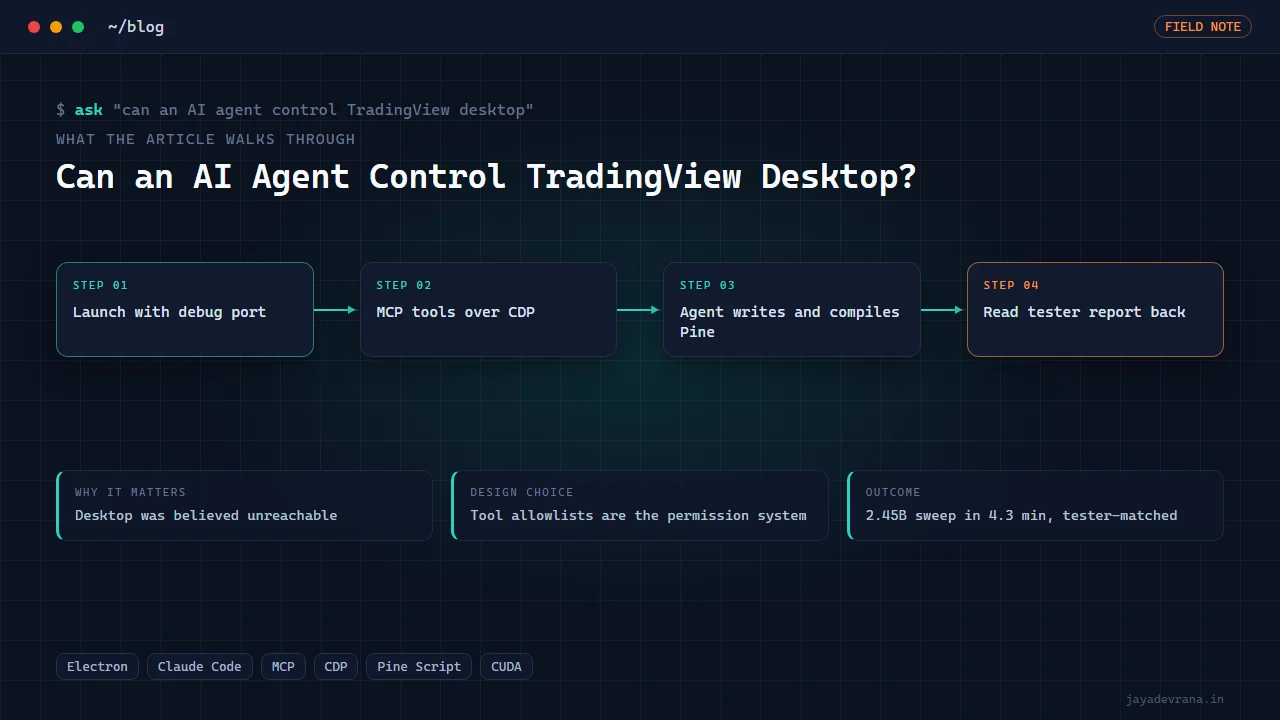
Yes, an AI agent can control TradingView Desktop. The desktop application is built on Chromium, and when it is launched fresh with a remote-debugging port it exposes the Chrome DevTools Protocol, the same interface browser automation tools use. Through that protocol an agent can open the Pine Editor, create a new script, type code, compile it, add it to the chart, read the Strategy Tester report and the indicator's inputs, and take screenshots, all inside the trader's real, logged-in TradingView rather than a sandboxed copy. Wrap those operations as tools in a Model Context Protocol server, give the agent a policy about which tools it may use, and you have a copilot that turns a plain-English idea into a compiled, attached and backtested strategy on your own chart.
For a long time the received wisdom was that TradingView Desktop was unreachable, with no debug port and no automation hooks. That turned out to be wrong, and discovering it changed what I could build. This post explains how the control path works, what the hard parts are, where the safety line sits, and how I built TV Pilot, the desktop app that puts Claude Code in front of a real TradingView.
How does the DevTools Protocol give an agent access to TradingView?
Chromium-based applications can be started with a flag that opens a local debugging port. A client connects to that port over a websocket and gains the DevTools Protocol: it can list pages, evaluate JavaScript in a page's context, dispatch real keyboard and mouse events, capture screenshots and observe network activity. TradingView Desktop, including the Microsoft Store build, accepts the flag on a fresh launch. That one fact is the whole foundation. Google documents the protocol itself at https://chromedevtools.github.io/devtools-protocol/.
From there, controlling TradingView is a matter of knowing which page elements to drive and which internal objects to read. That is the part that takes engineering, because TradingView's interface is a complex React application with keyboard handling that does not forgive shortcuts.
What are the hard parts of driving the Pine Editor by machine?
Four, in my experience:
- Creating a new script without touching the user's open draft. The naive approach of selecting all and typing over whatever is in the editor destroys the trader's work in progress. The agent must open a fresh script through the editor's own menu, using real key chords and the React click handlers rather than synthetic events, which the interface ignores or misroutes.
- Typing code reliably. The Pine Editor auto-indents and auto-closes brackets. Pasting via the clipboard or dispatching keystrokes with the editor's helpers disabled is necessary, or the code arrives mangled.
- Never sending Escape to the Pine editor. Escape in the wrong focus state discards changes or closes the editor. The agent's toolset simply does not contain that key.
- Reading results. Compile errors, strategy reports and study inputs live in TradingView's internal application state. Reading them through the page's own API, rather than scraping pixels, gives structured numbers the agent can reason about: net profit, trade count, drawdown, each input's current value.
Each of these was learned by breaking things on a throwaway layout. None are visible to the trader once they work; they are what makes "write me a strategy and backtest it" possible as a single request. Two earlier posts cover the Pine side the agent must also get right: AI-written Pine that will not compile and how to test for repainting.
Where is the safety line for an agent in a live trading tool?
An agent with full control over a real TradingView account could change the chart layout, delete scripts, fire alerts into live broker bridges or publish scripts publicly. The defence is not trusting the model to behave; it is giving it fewer tools. In TV Pilot, the tool set exposed to the agent depends on the mode the user selected:
- Safe mode reads only: chart data, indicator values, tester reports, screenshots.
- Build mode adds script creation, compilation and adding to the chart.
- Backtest mode adds the data extraction and GPU sweep tools.
- Full mode exposes everything, for users who want it and understand it.
The allowlist is enforced by the MCP configuration the app launches the agent with, so a tool not in the list does not exist from the agent's point of view. That is a permission system the model cannot talk its way around. Nothing in any mode places broker orders; TradingView's own alerts to any bridge remain under the trader's control, and this is engineering, not financial advice.
What can the agent actually do end to end?
The early-access demo of TV Pilot shows four complete runs, each from a typed request:
- Text to strategy. Describe an idea in plain English; the agent writes Pine v6, creates a new script, compiles it, fixes any compile errors it caused, adds it to the chart and reads back the Strategy Tester report, rendered as charts in the conversation transcript.
- Billion-system sweep. In backtest mode the agent extracts the chart's full history and hands it to the GPU engine, which evaluates 2.45 billion three-indicator systems and streams a live leaderboard into the app while it runs; in the demo it finished in 4.3 minutes, delivered a Pine strategy, and the Strategy Tester matched the engine within 0.15 percent on 21,936 bars of gold.
- Screenshot to indicator. Hand the agent an image of someone else's indicator; it builds a similar one and attaches it.
- Technical analysis read. Ask for a read of the chart; the agent reads price and indicator data and returns an entry, stop and targets as a structured note, as analysis rather than advice.
Why run the agent inside the real TradingView instead of a clone?
Because the result has to be true on the chart the trader actually uses. A strategy compiled and backtested in a replica proves the replica; the same strategy compiled and tested in the trader's own TradingView, on their data subscription, with their symbol and timeframe, proves what they will see tomorrow. The cost of that fidelity is the engineering above, and it is worth paying. The self-hosted route exists too, and I built that as well; see a self-hosted TradingView alternative with Pine Script for when it is the better fit.
How I built this: TV Pilot: Claude Code Driving TradingView Desktop
TV Pilot is a desktop application in which a trader types a request and watches it appear on their own TradingView chart, compiled, attached and backtested, without leaving the window. The architecture and build:
- Electron shell around a local server. The window hosts a chat transcript and controls; an Express server with server-sent events streams the agent's progress into it.
- The app spawns the real Claude Code CLI with a strict MCP configuration: the custom tv-mcp server plus a mode-specific tool allowlist, so the mode chosen in the UI is the permission system.
- tv-mcp speaks raw CDP to TradingView Desktop. It connects to the debugging port, finds the chart page, and exposes tools for creating a fresh script, typing and compiling Pine, adding to the chart, reading the strategy report and study inputs through TradingView's internal API, extracting bar data and capturing screenshots. The editor rules, real key chords, React onClick handlers, no Escape, are baked into these tools.
- Results come back structured. Strategy reports, inputs and chart data are rendered as charts inside the transcript rather than as text dumps.
- Backtest mode hands data to the GPU sweep. The agent extracts history, launches the 2.45-billion-system engine, and the app renders a live leaderboard from the engine's real progress files, verified on 21,936 gold bars with the Strategy Tester matching within 0.15 percent.
- Early-access demo. An eight-minute 4K recording shows the four runs above, each performed live.
The design decisions: control the real application rather than a copy, read state through the application's own objects rather than pixels, and make tool allowlists the permission model instead of prompts. The outcome is a copilot that produces Pine on the trader's chart with the tester's own numbers attached, and a corrected belief about what TradingView Desktop allows.
FAQ
Does this violate TradingView's terms?
Using the DevTools Protocol to drive your own desktop application on your own account is the same mechanism accessibility and testing tools use. It does not touch TradingView's servers in any way the application does not already, and it does not scrape or redistribute data. Review the current terms yourself; this post describes the engineering.
Can it run while I am using TradingView?
The agent shares the application with you, so it is best given an exclusive window of a few minutes for a build or backtest run. Forcing the window to the front on a timer is a bad idea, which is why the app asks rather than grabs.
Does it work with the web version of TradingView in a browser?
A browser tab can be driven the same way with the browser's own debugging port, and I have done it for recording lessons. The desktop build is preferable for a copilot because it stays open with its own window and does not compete with your other tabs.
Can the agent place trades?
Not through TV Pilot. No mode includes a broker tool. If the trader's own TradingView alerts are wired to a bridge, those alerts behave as they always did, under the trader's control.
If you want an agent built around a desktop application you already use, or TV Pilot adapted to your workflow, tell me on the contact page.
Building something in this space? I ship trading automation, Pine Script, MQL5 EAs, and full-stack tools with source and docs.
Start a project →